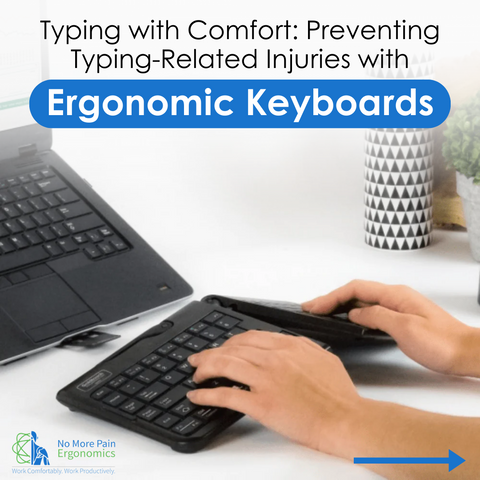
Imagine typing away at your keyboard, feeling a familiar ache in your wrists. You pause, wondering if there’s a better way to work without discomfort.
If this sounds like you, then you’re not alone. Many of us spend hours at our desks, unaware of the silent strain we’re putting on our bodies. But what if there was a solution that could change this daily routine and protect you from injury?
Enter the world of ergonomic keyboards. These innovative tools are designed with your well-being in mind, helping to prevent the common injuries associated with prolonged keyboard use. As you explore how ergonomic keyboards can transform your workspace, you’ll discover simple adjustments that make a significant difference. You’re about to uncover the secrets to working smarter, not harder, and ensuring your comfort for the long haul. Ready to find out how? Let’s dive in!
Ergonomic Design Principles
Ergonomic keyboards are thoughtfully designed to minimize discomfort and prevent injuries associated with prolonged keyboard use. These keyboards focus on promoting a natural hand position and reducing strain. By adhering to ergonomic design principles, they provide a healthier typing experience.
Natural Hand Position
One of the key aspects of ergonomic keyboards is their ability to support a natural hand position. Imagine typing with your wrists straight and your hands slightly angled outward, mimicking the position they naturally fall into when relaxed. This alignment helps to avoid awkward wrist bends that can lead to discomfort or injury over time.
Many ergonomic keyboards feature a split design or a slight tilt, allowing your hands to remain in a more relaxed posture. This setup encourages your arms and shoulders to relax as well, decreasing tension in your upper body. Have you ever noticed how much more comfortable it is to maintain a natural hand position rather than forcing your wrists into an unnatural angle?
Reducing Strain
Ergonomic keyboards are crafted to reduce strain on your hands and fingers, which can help prevent conditions like carpal tunnel syndrome. By incorporating features such as cushioned palm rests and adjustable keyboard heights, these keyboards provide a tailored typing experience that minimizes pressure points.
Some keyboards also come with customizable key switches that require less force to press, reducing the strain on your fingers during long typing sessions. This feature can be particularly beneficial if you spend countless hours typing each day. Have you ever felt the fatigue in your fingers after a long day of typing? An ergonomic keyboard might be the solution you’ve been searching for.
By prioritizing ergonomic design principles, ergonomic keyboards not only promote comfort but also contribute to long-term health and productivity. How could a small change like this improve your daily routine and well-being?
Common Injuries From Traditional Keyboards
Traditional keyboards can lead to various hand and wrist injuries. Many people spend hours typing every day. This repetitive motion can strain muscles and tendons. Poor posture and awkward hand positions worsen these effects. Understanding these common injuries can help in choosing better alternatives.
Carpal Tunnel Syndrome
Carpal Tunnel Syndrome affects many keyboard users. It occurs when the median nerve in the wrist is compressed. This nerve runs through the carpal tunnel, a narrow passage in the wrist. Symptoms include numbness, tingling, and pain in the hand. Repetitive typing can worsen these symptoms over time. Taking regular breaks helps reduce the risk.
Tendonitis
Tendonitis is another common issue with traditional keyboards. It involves inflammation of tendons in the hand or arm. This condition causes pain and stiffness. Typing for long periods without breaks can lead to tendonitis. Ergonomic keyboards can help by reducing strain on tendons. Adjusting keyboard height and position can also prevent injury.
Features Of Ergonomic Keyboards
Ergonomic keyboards are designed to minimize strain and reduce the risk of injury during extended periods of typing. Their unique features cater to the natural positioning of your hands and wrists, offering comfort and efficiency. By integrating these keyboards into your workspace, you can enjoy a more productive and healthier typing experience.
Split Keyboard Layout
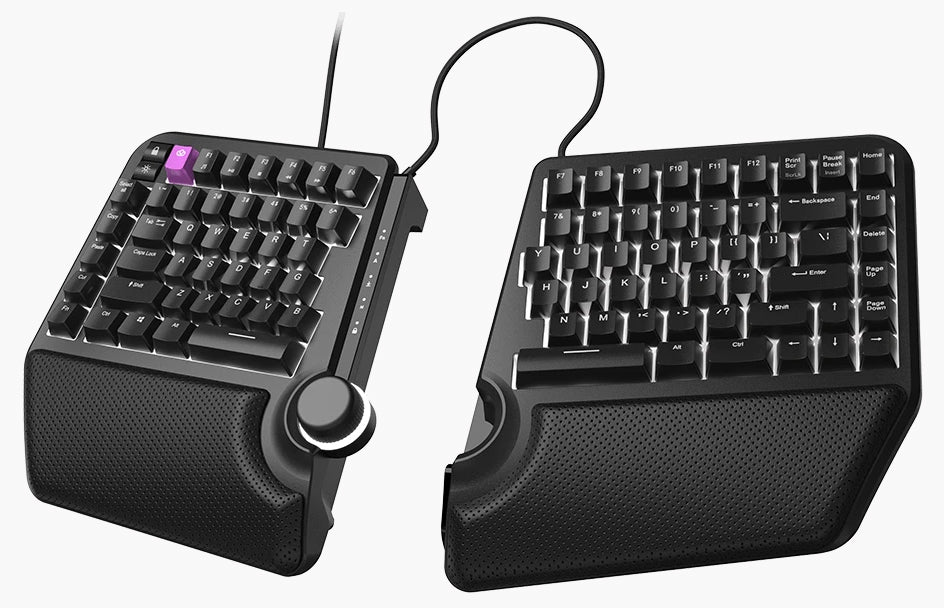
One standout feature of ergonomic keyboards is the split layout. This design separates the keys into two distinct sections, allowing you to position each half according to your shoulder width. Imagine typing without the discomfort of cramped wrists—this layout promotes a more natural hand posture.
Do you often find your wrists bending awkwardly while typing? With a split keyboard layout, your hands can remain aligned with your forearms, significantly reducing strain. This feature can be a game-changer for anyone who spends long hours at the computer.
Adjustable Angles
Ergonomic keyboards also offer adjustable angles, letting you fine-tune the tilt to suit your comfort level. Whether you prefer a slight incline or a more pronounced slope, this feature allows you to customize the setup to your needs.
Have you ever noticed discomfort in your wrists after a long day of typing? Adjusting the angle of your keyboard can alleviate pressure and provide a more relaxed typing posture. Consider experimenting with different angles to find what works best for you.
These features of ergonomic keyboards not only improve comfort but also protect against common injuries associated with typing. By incorporating such thoughtful designs, these keyboards offer practical solutions to everyday typing challenges.
Benefits Of Ergonomic Keyboards
Ergonomic keyboards offer numerous benefits for users. They help in reducing the risk of repetitive strain injuries. These keyboards are designed to fit the natural position of your hands. This can prevent discomfort and pain.
Improved Comfort
Ergonomic keyboards provide a more comfortable typing experience. They reduce the strain on your wrists and hands. This can help in preventing long-term injuries. They often come with a split design. This allows your hands to rest naturally. The keys are positioned to minimize awkward finger stretches. Padded wrist rests offer additional support. This further enhances comfort during long typing sessions.
Enhanced Productivity
Comfort leads to better productivity. With ergonomic keyboards, typing becomes easier and faster. Users can focus more on their tasks. Reduced discomfort means fewer breaks due to pain. This allows for longer periods of uninterrupted work. The efficiency of typing increases with these keyboards. Less time is spent correcting errors from awkward hand positions. An ergonomic setup can lead to smoother workflow.
Choosing The Right Ergonomic Keyboard
Choosing the right ergonomic keyboard is essential for preventing injuries. Ergonomic keyboards are designed to support your hands and wrists, reducing strain. With various options available, it’s crucial to find the one that suits your needs.
Assessing Needs
Identify what features are important for you. Consider your typing habits and comfort preferences. Do you need a split keyboard for better hand positioning? Or a curved design to ease wrist tension? Think about your daily usage. Frequent typists may benefit from specialized layouts. Casual users might prefer simpler designs. Look for keyboards with adjustable settings.
Budget Considerations
Set a realistic budget for your ergonomic keyboard. Prices can vary greatly. High-end models offer advanced features and durability. More affordable options still provide essential ergonomic benefits. Compare different brands and models within your budget. Check online reviews to ensure quality and satisfaction. Investing in a good keyboard can save money on future health issues.

Credit: dygma.com
Tips For Keyboard Setup
Ergonomic keyboards help prevent strain injuries like carpal tunnel syndrome. They support natural hand positions, reducing tension. Comfortable designs enhance typing efficiency and minimize wrist discomfort.
Setting up your ergonomic keyboard properly can significantly reduce the risk of injury. A well-arranged keyboard setup not only promotes comfort but also boosts productivity. Here are some practical tips to help you achieve the perfect ergonomic keyboard setup.
Proper Desk Height
Your desk should allow your arms to rest comfortably at your sides, with your elbows bent at a 90-degree angle. If your desk is too high, consider using an adjustable chair to raise your seating position. Alternatively, if your desk is too low, you might add a desk riser or use a keyboard tray.
Positioning For Optimal Use
Place the keyboard directly in front of you, aligning the ‘B’ key with your belly button. This helps maintain symmetry, preventing undue strain on one side of your body. Keep your keyboard flat or tilted slightly away from you to minimize wrist extension. Consider using a wrist rest to support your wrists during breaks, but avoid resting your wrists while typing. This prevents added pressure on the carpal tunnel area. How does your current setup compare? Small changes can make a big difference.
Maintaining Healthy Habits
Maintaining healthy habits is crucial for preventing injury while using ergonomic keyboards. These keyboards are designed to minimize strain on your hands and wrists. To maximize their benefits, it’s important to incorporate regular breaks and exercises into your routine. These practices help reduce fatigue and promote better circulation.
Regular Breaks
Take short breaks every hour. Stand up and stretch your body. This helps reduce tension in your muscles. It also gives your eyes a rest from the screen. Use a timer to remind you to take breaks. Regular breaks improve focus and productivity.
Exercises For Hands And Wrists
Stretch your fingers and wrists regularly. Flex and extend your fingers slowly. Rotate your wrists in circles. These exercises enhance flexibility and strength. Squeeze a stress ball to strengthen your grip. Consistent practice keeps your hands healthy.
Credit: www.nomorepainergonomics.com.au

Credit: www.amazon.com
Frequently Asked Questions
How Do Ergonomic Keyboards Prevent Injuries?
Ergonomic keyboards reduce strain by promoting natural hand positioning. They minimize wrist and finger stress, preventing repetitive strain injuries. Their design supports proper posture, enhancing comfort and reducing muscle fatigue during extended typing sessions.
What Are The Benefits Of Ergonomic Keyboards?
Ergonomic keyboards reduce strain on wrists, improve comfort, and enhance typing efficiency. They help prevent repetitive strain injuries. Designed for natural hand positioning, they offer better support and can boost productivity. Users experience less fatigue, promoting healthier typing habits and overall well-being.
What Is The Correct Typing Ergonomics To Prevent Discomfort And Injury?
Maintain a neutral wrist position while typing. Keep elbows at a 90-degree angle. Position the screen at eye level. Use a supportive chair to keep feet flat on the floor. Take regular breaks to stretch and relax your hands and wrists.
How Do Keyboard Shortcuts Help Reduce Repetitive Strain Injury For Users?
Keyboard shortcuts minimize mouse use, reducing hand movement and strain. They enhance efficiency, lowering the risk of repetitive strain injuries. Using shortcuts allows for smoother, quicker navigation, decreasing physical stress. Users experience less fatigue, promoting healthier computer habits and preventing long-term strain-related issues.
Conclusion
Ergonomic keyboards help protect your hands and wrists. They reduce strain and discomfort. Using them can prevent injuries like carpal tunnel syndrome. Comfort at work means better productivity and fewer breaks. Invest in your health with the right tools. Your hands deserve care and support.
Choose keyboards that fit your needs. Feel the difference in every keystroke. Better health starts with simple changes. Your future self will thank you. Stay healthy and keep typing happily.
